Showing posts with label ink. Show all posts

August 7, 2010

Blended Ink Tutorial

For my August Summer Camp gallery, I made a layout about bread in Switzerland. The journaling block is created using the blending tool by Tim Holtz and a bunch of Distress Inks. It's a pretty easy technique, one that takes a bit of practice, but can be easily mastered in just a few tries. I've put together a video tutorial to help show you how to do the technique on your own projects.


supplies used: blending tool, foam blenders, faded jeans, peeled paint,
and mustard seed distress inks (any distress inks can be used for this project).

Here's a close up of the technique.


I would love to see how you interpret this in your own layouts, it's really fun to see the unique results after each attempt. If you don't own the blending tool yet, it's very reasonable to purchase, and you can use the foam blenders for numerous applications if you stamp it off well.

April 22, 2010

Insider Tips - dye your tags using Maya Mists!

Hey everyone! :)

You know how much my Maya Mists? Well, I wanted to show you a new way to dye paper tags : I think you might like it! :)

We're going to make a layout and this is what I used for my layout :

Simply choose a cardstock that is the same color as one of your favorite alphas and glue all the letters, words, sentences you want onto your cardstock (you probably want to cut the cardstock first before adhering all the chipboards, otherwise might be a pain to cut afterwards).


Grab your kraft sheet, 2 tags and 2 small zip lock bags.


Spray Maya Mist in each plastic bag (one color per bag).


Open and put one of the tags inside a plastic bag. Use your finger to make the ink move onto the tag.


Use your heat gun to dry each tag.

Once your tag is dry and ready to use, you can also fold it and put it back into the same color bag.

All the wrinkles will get bolder and darker because of the ink. Use your heat gun to dry again.

You can use your tags the way you want. I like to use them as a new way to focuse on the photos.


Extra item I can't live without and that I used for this layout :
Enjoy!
Céline

April 8, 2010

The Mind Behind the Mini

I'm not much of a mini-maker. I really don't have a place to put little albums, don't want to stick them in a drawer, and most times I just don't finish them.

But this month when the big box of goodness arrived on my doorstep, I was a bit baffled with what to do with the Maya Road chipboard banners. I had recently posted some faux TTV pictures on my blog, and I thought that it would be a good idea to start a charm bracelet-esque mini for my travels. One that I can add to each time I visit a new place.


I used my most favorite Studio Calico stamps - the Noah Alphabet Set to abbreviate the cities, like "NY" , "CHI", and "NOLA."


Then on each opposing banner, I wrote what year the trip was, where we went and who I was with.


I added my pictures, some bright bits, punched holes, inked the edges with Black Staz-On, sprayed a layer of Charcoal Mist and strung it all together on a ball chain.


I'm really excited at how it turned out. Are you a mini-maker?

April 5, 2010

challenge : make a card out of scraps

Hi all!! Steph W and I are hosting the blog this week, and I'm here to start things off with a challenge. =)

I've admitted before that I'm a messy scrapper. As I work, my desk gets covered in little bits of patterned paper and embellishments or stamped images that didn't make it onto a page for one reason or another. When I clean up, I tend to think that these little bits and pieces would make great cards.


This card uses mostly bits from my most recent page - piggy rides. The 3 circles were already punched in the backing from a package of Studio Calico's rubons. I had stamped the house in Mustard Seed before settling on Tumbled Glass for the page, so I used that along with a scrap of the Home Front Blown Fuse paper. I finished the card with some stitching, vintage seam tape and bits of fabric from a recent sewing project.


This card uses leftovers from my Joyland kit. I liked the effect of layering these two papers when I used it on my 3 of a kind page, so I used the same technique to make a big "9" for my oldest's birthday.

So that's our challenge for this week. Take the leftover, cast aside and not used items from your last project and throw them together into a quick card. Post a link to your card on this thread on the message board, and we'll draw one winner for a $5 gift certificate to the shop. You've got until midnight EST on Saturday night to enter!

December 31, 2009

tutorial : snow frosted background

Happy New Year's Eve! I'm popping in here today with a tutorial to help you add a layer of frost to your winter layouts.

The January kit, Whodunit, has a gorgeous color scheme that is awesome for any season - but I wanted to make it even *more* winter-y for a page featuring my older boys sledding with friends. I started my page by drawing a border 1in in from the outside of my 12x12 cardstock, and then punching squares of various patterned papers from the kit and arranging them in rows inside my square. I used a square punch from Fiskars, but you could simply use your trimmer to cut squares if you don't have a punch. I attached each square of patterned paper to my background using just a bit of adhesive in the middle of the square.


Now, I'm loving this color scheme, but it's a bit spring-y for what I'm going for. I could have left out the greens and yellows, but I really liked the pattern that those pieces added. I knew a wash of white paint could tone down the colors and give me the effect I wanted. I used Manila paint by Making Memories, but Claudine Hellmuth's Blank Canvas paint would work just as well. I love these brushes - the set is inexpensive and they are *much* nicer than the brushes I used to pick up at my local craft store! I put a glob of paint on a paper plate and then soaked my brush in water. I dabbed the brush in the paint and then brushed it across the plate a couple times to remove the excess paint and water. Remember - you can always ADD more paint to the background, but you can't take it away - you'll want to start with very little paint on the brush. If you get a spot that looks too watery, press a paper towel over the top to soak up the excess.


I brushed my watered down paint across the background, adding more paint and water as my brush got dry. I ended up doing two coats to get the shading that I wanted. I painted a little outside my block of squares on all sides to give the piece a nice border. While the paint was still wet, I sprayed the whole background with Silver Plated Maya Mist - the Iridescent Pearl would give you a similar effect. It didn't add any color, but it *did* add a frosty shimmer. Since I only adhered each square in the middle, the water in the paint warped each piece a bit, giving the background some dimension. I hadn't planned on this, but really loved the effect.


I love the star stamps that came with the main kit, and wanted to work them into my design. I laid my photos and journaling block onto my page so I had an idea of what areas would be covered, and then added a couple of stars to each row. I stamped with silver pigment ink and embossed them with clear embossing powder - the stamping is subtle, but adds an extra bit of shimmer and interest to the background.
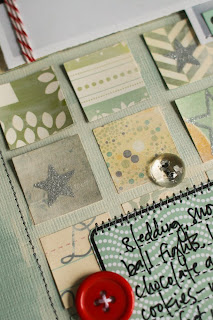


I cut the scallop sticker from the sticker sheet in half and added it to the top left and bottom left of my square of blocks and then I stitched a border with grey thread. I stamped the journaling stamp with black ink on blue patterned paper twice, and cut each block out. I used one whole to hold my journaling, and cut the top off another and used it as a date tab at the top of my page. I took advantage of the white space in my larger photo and layered the smaller one on top of it, and then added them to my page with foam adhesive. I wrapped the photo with red baker's twine and finished the layout with a few button accents, and a label sticker embellished with star rubons.


While I've used this white washing technique to get a snowy look, it can also be used to unify *any* collection of patterned papers. This would be a great way to use up a bunch of scraps that don't quite match. You could also add a twist to it by using a bolder mist over the top of your background. I hope you get a chance to try this technique, and please link me up if you do!!

December 23, 2009

Ode to my Mom :)

Hello everyone!

I know everyone is getting ready for Christmas but I thought you wouldn't mind seeing the cute gift I made my mom using the amazing Printers Tray project kit :)

I know it's quite difficult sometimes to find Christmas gifts for our loved ones, especially if they keep telling you they don't need anything! Well, there's one thing they always need : LOVE!

So, I thought I would work on a project to make my mom happy and I know she's going to like it :)

Ok so this is what you might need to make this project :

First of all, you need to cut twelve 2,5x3,5" pieces of paper into your favorite patterned papers (one piece for each little window).


My photos are a little bit smaller than the ATC's size as I've been having problems with my printer but, in a way, I like it better like this as I managed to mount them on patterned papers and it looks good too.
You'll see that, on another ATC, I used this clear acrylic butterfly as a mask with my Charcoal mist. You just need to use a baby wipe to clean your butterfly afterwards.


Here's a very clean design, not to get a too overwhelm and busy design on all of my ATC's.


For this one, I just cut stripes of papers, glue it on my ATC and sprayed some mist on top of it all. Then you can use a heat gun to make it dry faster, if you don't like to wait (just like me). Cutting the chipboard button can add interest to your design, as you're working in frames.


Those tiny flowers are just too cute for words!


You can use tiny embellishments on your alphas as well.


This is what I was explaining earlier with the butterfly clear acrylic. Doesn't it look cool? Simply outline it with a white pen, write a bit of journaling inside the shape and ta-da!

Here, I cut a flash card in two and work on two ATC's frame at a time, in order to match the design a little bit.

And this is what it looks like in my artroom vintage wall! :) Too bad I'm giving it to my mom because I think it looks great on my black&white vintage wallpaper :D but that'd be the reason to get me another Printer's tray :)

I hope you liked it, girls, that you got as much inspiration as you can :)

Merci! :)

Céline

December 19, 2009

A Little ATC Action


I've been playing around with ATCs for a few years now, and I must say, to be so simple, these little pieces of art are easy, creative and addictive. An ATC, or Artist Trading Card, is a collectible card, sized at 2.5" x 3.5". They are for keeping, collecting or trading, usually with other artists and crafters.

I love ATCs for many reasons...they are quick and easy, they are a great use of scraps, and there are absolutely no rules. No matter if you're into paint, stamping, doodling or just using up some of your stash, you can make an ATC.

The possibilities are endless when making these, but I usually like to start out in one of two ways - with a blank piece of stiff cardstock or chipboard (the backers that come in paper packs or cereal boxes work great), or by simply using a standard size playing card.

Step 1: I painted my playing card with simple acrylic white paint, like Claudine Hellmuth's Studio paint in Blank Canvas.


I let the paint dry to the touch, but not completely.

Step 2: I sprayed the card with Maya Mist in Turquoise and blotted it dry.


Step 3: Because I wanted to stamp on top of paint and mist, I decided to use a solvent ink like Staz On in Black. I used two of my favorite Studio Calico stamps, Hot Air Balloon and Schooltime ABC Border . I stamped very lightly with both so as to just give the impression of the stamp. I also took a new and yet-to-be-revealed Studio Calico stamp, and stamped right in the middle of the mist. Because the paint hadn't dried yet, the stamp pulled the paint off in all the right places, revealing the red design of the playing card underneath.


Step 4: I added some random bits and pieces from my desk...a scrap of paper from January's kit that I punched with a binder punch very similar to the one in the shop, did a teeny bit of stitching and stapled on a random word.


And that's it! Easy peasy and so much fun. If you want to learn more, there are countless websites dedicated to making ATCs and you can always check out the past posts about ATCs on the blog. I'd love to see yours, so feel free to link 'em up!